
Copilots have a way of sounding like an easy win. You roll them out, teams start using them, and productivity is supposed to go up. Drafts get written faster. Meetings get summarised. Research takes less time. On paper, the return on investment almost feels automatic.
That is usually how the conversation starts at the leadership table. If people can work faster, the business should see value. Simple enough.
But once you try to put real numbers behind that value, things get uncomfortable. Productivity in knowledge work does not move in clean, visible lines. Time saved does not always show up as time freed. Better outputs do not always translate neatly into measurable business impact. What looks like an obvious ROI story at rollout quickly turns into a harder question about what actually changed in the way work gets done.
This is where many organisations pause. Copilots promise efficiency. Proving that efficiency, in a way that stands up to scrutiny, is a different challenge altogether.
What “Copilot” Actually Means in a Business Context
Where Copilots Actually Sit in Your Workday
In practice, Copilots are AI tools that sit inside the software your teams already use. Day to day, that shows up in small ways. You ask for a first draft instead of starting from nothing. You get a summary of a long thread instead of reading everything. You use it to structure notes or scan information before deciding what to focus on.
The Part That Changes the Experience of Work
What matters is not the tool itself. It is where it sits in the flow of work. Copilots show up at the points where people usually lose momentum. Starting tasks. Pulling context together. Cleaning up information before decisions happen.
Why the Impact Often Feels Quiet at First
Copilots do not replace full processes. They reduce effort across many small steps in the day. Those gains feel easy to overlook early on. Over time, they can accumulate. Whether they turn into real business value depends on how deliberately teams learn to use them.
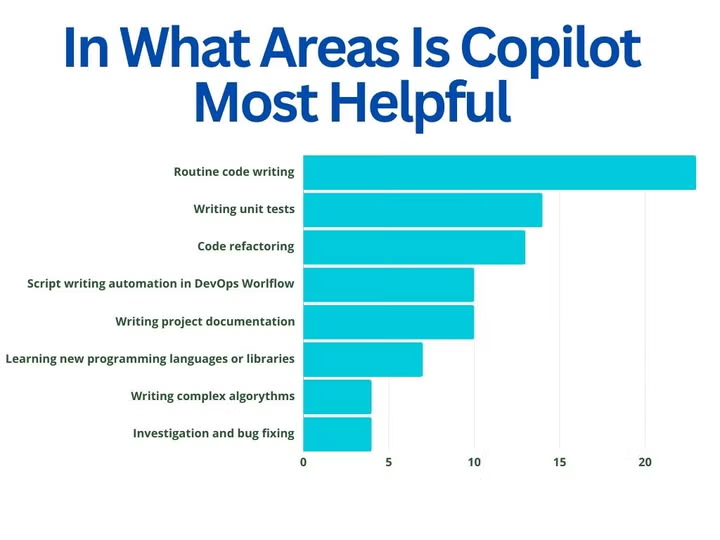
Alt text: Bar chart showing Copilot is most helpful for routine code writing, unit tests, and code refactoring.
Quick Answer: Do Copilots Deliver Real ROI for Businesses?
Yes, Copilots can improve productivity and create measurable value. Teams spend less time getting started on work, less time cleaning up information, and less time doing routine first-pass tasks.
But that return is uneven. Some teams feel the impact quickly. Others struggle to turn usage into anything meaningful for the business. The mistake is assuming ROI shows up on its own once licences are active. Productivity tools do not create value just by existing. The return builds as teams learn where Copilots fit into real workflows, leaders set expectations around outcomes, and measurement moves beyond surface-level usage.
Why ROI Sounds Straightforward Until You Try to Measure It
Think about the last time a new productivity tool rolled out in your organisation. People used it. Some tasks got faster. The tool was labelled a success. But when finance asked what actually changed in business terms, the answer probably felt vague.
For example, a Forrester-commissioned Microsoft study projects three-year ROIs between 132% and 353% for Microsoft 365 Copilot in certain SMB scenarios.
Dig into the detail and the story gets messier. Forrester’s TEI breaks the benefits into concrete time savings by task: respondents reported average time reductions such as 34.2% for content creation, 29.8% for information search, and about 18.6% for meeting summarisation. Those are real gains on paper, but they are also task-level percentages, not organisation-wide outcomes.
A few practical realities explain why the headline math rarely maps cleanly to the P&L:
- Time saved is not always time recovered.
People may spend less time writing emails, but they often use that time for additional meetings, reviews, or other duties instead of work that can be billed or generate revenue. Microsoft’s own rollout guidance emphasises tracking “AI-assisted hours” alongside qualitative measures like net satisfaction, because raw minutes alone miss context.
- Early signals come from pilots with highly motivated users.
Pilots and case studies often show big per-user improvements. Insight reports say that employees in certain professions are more productive by about four hours a week, but pilots are optimised environments. When you scale those gains over a whole business, you can see where there are gaps with adoption, data readiness, and process fit.
- Measurement requires new instrumentation.
To get past vanity metrics, you need to connect Copilot use to business results, such as shorter process cycle times, fewer rework cycles, faster time-to-decision, or fewer people needed in a repeatable workflow. That means you need Copilot analytics, tools in your processes, and a clear starting point for comparison. Microsoft’s Copilot Analytics playbook is explicit about this.
Where Productivity Gains Actually Show Up
You tend to feel the impact of Copilots most in the parts of your day that are repetitive, high in volume, and hard to avoid. These are not transformational workflows. They are the small, frequent tasks that quietly eat time.
Drafting
Think about how much time your teams spend getting a first version on the page. Emails, proposals, internal notes, reports. Starting is often the slowest part. When Copilots help with first drafts, early enterprise rollouts show that drafting time drops by roughly 30 to 35%. That does not remove the need for review or judgement. It simply means your teams spend less energy staring at a blank screen and more time shaping the message that actually matters.
Summarisation
Long threads, dense documents, and meeting notes may add up quickly. You don’t have to read every word to move on, but you do need to know what’s going on. Teams say that when Copilots describe conversations and documents, they have to do less catch-up work, which saves roughly 15 to 20% of their time. The real gain here is not speed alone. It is so that you and your teams can get oriented faster and spend more time on decisions instead of catching up.
Meeting preparation
Preparing for meetings is one of those invisible drains on the workday. Reading background notes, scanning updates, and pulling context together takes more time than the meeting itself. When Copilots help pull key points and action items from past discussions, preparation time drops noticeably in early deployments. That does not change how many meetings you attend, but it reduces the cognitive overhead of each one.
First pass analysis
You often need a starting point before real analysis begins. A quick scan of data. A rough set of themes. A list of angles to explore. Copilots help with that first layer of sense-making. Teams report that initial analysis steps move faster, even though final decisions still rely on human judgement. The value here is momentum. You move from raw information to something you can think about much sooner.
Where ROI Breaks Down in Real Organisations
Copilots Land Inside Messy Processes
If your workflows are already unclear, Copilots inherit that confusion. Information is scattered. Ownership is fuzzy. People are not sure which version of a document matters. In that context, the tool cannot create structure for you. It simply reflects what is already broken. Copilot productivity gains become uneven, and trust in the output drops.
Teams Are Left to Figure It Out Alone
Copilots work best when people know how to apply them to real tasks. When that guidance is missing, usage becomes random. Some people experiment. Others ignore the tool altogether. Without clear use cases tied to everyday work, adoption stays shallow and the ROI never compounds.
Behaviour Change Is Assumed, Not Designed
New tools do not change how people work on their own. If expectations, incentives, and rhythms of work stay the same, behaviour stays the same. Copilots sit in the background. The ROI breaks down not because the technology underperforms, but because the organisation never created space for work habits to change.
The Teams That Feel the Value Early, and the Ones That Don’t
| Teams that tend to see value first | Teams that struggle to justify the spend |
| Knowledge-heavy roles with repetitive cognitive work, such as strategy, research, finance, and operations | Roles with low digital workflow maturity where much of the work still happens outside structured systems |
| Functions where drafting, summarisation, and first-pass analysis are part of the daily rhythm | Work that depends heavily on tacit knowledge, experience, or situational judgement |
| Teams with relatively clean data and clear workflows | Environments with weak data foundations and fragmented information sources |
| Roles that already work inside digital tools for most of the day | Roles where work happens largely in physical or unstructured contexts |
How to Think About Copilot ROI Without Chasing Vanity Metrics
Moving Past Usage as a Proxy for Value
It is tempting to track logins, prompts, or active users and call that progress. Those numbers tell you whether Copilots are being touched. They do not tell you whether anything meaningful changed. High usage can coexist with low business impact if the work itself stays the same.
Looking for Signals That Actually Matter
The more useful signals sit closer to outcomes. Are cycle times shrinking for specific processes. Are decisions getting made with better context. Are teams spending less time on rework, chasing information, or duplicating effort. These shifts are harder to capture, but they tell you far more about real value than usage ever will.
Letting Measurement Evolve With Adoption
Early on, you may only be able to track rough indicators. Over time, as Copilots settle into real workflows, your measurement needs to become more specific. What starts as directional signals should mature into process-level metrics that leadership can actually act on.
So If ROI Is Real but Uneven, How Should You Approach It?
If the value exists but does not show up evenly, the answer is not to abandon the investment. It is to get more intentional about where and how you expect returns to appear. That is where a practical approach to rollout and measurement starts to matter.
How Leaders Can Take a More Honest Approach to Copilot ROI
Anchor Copilot to Real Work, Not Broad Rollouts
Don’t bring out Copilot to everyone all at once. Instead, start with a few workflows where time lost is clear. For instance, if your sales staff spend hours writing proposals, set a rule that Copilot must be used for the first draft. If your leadership team goes over extensive decks every week, make it clear that Copilot should be utilised to summarise the main points before meetings.
Make Adoption Part of How Performance Is Managed
If Copilot usage is optional, the value stays patchy. For example, you can ask managers to review how Copilot changed turnaround time for weekly reports or client updates. When adoption shows up in normal performance conversations, behaviour shifts without forcing people.
Treat Copilot as a Change in How Work Gets Done
Make sure you know what needs to be different about how things are done. For example, if analysts use Copilot to get first insights, everyone agrees that deeper evaluations should start at that point, not from beginning. When teams understand how their work is going to change, Copilot stops feeling like an extra and starts feeling like part of the job.
Conclusion
The effect stays small if you think of Copilot as a feature. If you see it as a change in how work moves through your business, the value will grow over time.Zamun can help you connect your technology choices to the way work gets done on the ground if you want to go beyond just using new technology and make it really transform how your teams function.
You can see early signs in a few months, like tasks getting done faster or less rework. It takes longer to see a real return on investment since it takes time for people to change their behaviour and for workflows to change.
High usage only tells you that people are trying the tool. If outcomes are not changing, the use cases may not be tied to real work or the metrics may not reflect what actually matters.
Copilot changes how work gets done more than it replaces roles. It speeds up starting points and routine steps. Judgement, accountability, and decision making still sit with people.
Yes. Because workflows are easier, smaller teams frequently get results faster. Larger businesses can realise higher absolute gains, but ROI is less consistent because of variances in scale, data complexity, and adoption.
NowTheNext Glossary
Click a term to view its meaning.